Home Entertainment Blog
Brought to you by your friendly, opinionated, Home Entertainment and Technology writer, Stephen DawsonHere I report, discuss, whinge about or argue on matters related to high fidelity, home entertainment equipment and the discs and signals that feed them. Since this Blog is hand-coded (I like TextPad), there are no comments facilities. But feel free to email me at scdawson [at] hifi-writer.com. I will try to respond, either personally or by posting here emails I consider of interest. I shall assume that emails sent to me here can be freely posted by me unless you state otherwise.
Archives
Permalinks are the date/time references.
Commencing:
10 December 2009
15 October 2009
10 September 2009
9 July 2009
11 June 2009
23 April 2009
2 April 2009
12 February 2009
15 January 2009
20 November 2008
9 October 2008
4 September 2008
31 July 2008
10 July 2008
12 June 2008
21 February 2008
3 January 2008
22 November 2007
14 June 2007
11 April 2007
16 November 2006
29 June 2006
13 April 2006
12 December 2005
11 August 2005
3 February 2005
28 October 2004
9 September 2004
12 August 2004
29 April 2004
8 April 2004
25 March 2004
11 March 2004
19 February 2004
1 January 2004
20 November 2003
23 October 2003
10 October 2003
25 September 2003
4 September 2003
21 August 2003
14 August 2003
7 August 2003
31 July 2003
24 July 2003
17 July 2003
10 July 2003
3 July 2003
Date/Time is Australian Eastern Standard or Summer Time as appropriate.
DVD/Blu-ray Links
Technology Links
Hardware Links
AV Channel
AVS Forum Blu-ray Audio and Video Specifications Thread
Blu-Ray Region Code Info
CinemaSquid's Blu-ray Movie Database
The Chopping List
dStore Australia
Doom9
DVD Copy Control Association
DVD Faq
DVD Forum
DVD Orchard
DVD Plaza
DVD Region Free
DVD+RW Alliance
DVD+RW Unofficial
DVDownunder
DVDR Help
EzyDVD
Gallery of DeCSS
Internet Movie Database
Michael D's Region 4
Rockian (audiophile discs)
Stream AV
Warner Home Video
Widescreen Museum
Dolby Laboratories
DTS
Nick's Auditorium
Projection Display Technology
RightMark Audio Analyzer
SACD
Secrets of Home Theater
Sound Studio and Audio Calculations
Video Signal Standards
Aaron Speakers
Accusound Speakers
Amber Technology
Audio Products Australia
B&W Speakers
Bose Australia
Castel Electronics
CEDIA Australasia
Convoy International
Creative
Definitive Technology
Denon
DEQX
DGTEC
Duratone
DynAudio
Grundig
Harman Kardon
International Dynamics
JBL Speakers
JVC
Krix Speakers
LG Electronics
Linn Products
Loewe
Marantz
Meridian
Monitor Audio
Musical Fidelity
NEC
OzHiFi
Panasonic Australia
Paradigm Speakers
Perreaux
Pioneer Australia
Philips Electronics
QualiFi
Rome Technology
Samsung
Sonique Audio
Sony Australia
Spendor Loudspeakers
Strong Technologies
Syntec International
VAF Research
Wharfedale
Whatmough Monitors
Whise Subwoofers
Well, I’ve decided at last to move to proper Blog software – WordPress. Over time I shall migrate in all the old stuff from this Blog over there. So here it is!
Well, it turns out that high-end brand Lexicon has released a Blu-ray player which is really the Oppo BDP-83 with Lexicon cosmetics. Audioholics makes a pretty convincing case here.
Nothing wrong with that, necessarily, except that Lexicon insists that it has tweaked the unit and according to Audioholics tests, it's pretty hard to see how it could have. Oh, and apparently the Lexicon BD-30 costs some $US3,000 more than the $499 Oppo!
Well, you do find these things. The NAD T587 Blu-ray player was essentially a prettier looking LG BD300 Blu-ray player. Some companies never developed their own DVD players from the ground up, and even today use the internals from some other brand.
Well, at least Lexicon chose what seems to be the best Blu-ray platform presently on the market.
I was just clearing some old stuff off my computer and discovered a video clip that demonstrates that competent upscaling can be elusive even for professionals. The clip is six minutes long, which I recorded from the Prime TV HD service here in Canberra back on 19 November 2009. It was from its morning show -- the clip aired around 10:33am -- which sells lots of stuff. Having a look at it, I can see what originally caught my eye.
Look closely at the text in this frame, which is part of the show not long before a break for advertising:

The frame is 1,920 by 1,080 pixels (actually, broadcast at 1,440 by 1,080, but my application rescales it). I have scaled this down, of course, but see the round inset, which is a part of the original frame at the original display resolution. Do you see the fine horizontal lines in the detail of the text? This is very common artefact of poor deinterlacing prior to upscaling. I've been talking about this for going on three years (see the top rendition of 'SPORT' in the graphic).
To make it clearer, here's the inset at 300% of original size:

But this is unnecessary. In fact, the same clip contains a regular advertisement with nicely clean text:

So the problem is related to the show itself, and how its content is scaled. When the show resumed, the problems resumed:

I still haven't quite got my head around what interaction between deinterlacing and scaling (from 576i to 1080i) could result in these artefacts. Any suggestions?
In December it was widely reported that the European Union is to require that MP3 players have a default maximum level of 85dB. Whatever the hell that means. 85dB average? Peak? A-weighted? C-weighted?
Apparently some kind of over-ride will be permitted. Yippee.
Meanwhile, some pains-in-the-arse lost their court case in California. They were suing Apple over the iPod, claiming its product was unsafe because of the possibility of hearing damage due to high output levels. The court held that the iPod was simply doing the job for which it was designed: reproducing music. A lawyer for those aforementioned pitas said that 'Hopefully someone in the government in the United States will follow suit', referring to the EU decision.
These people are seemingly clueless.
The output level of a sound reproduction system is determined by two things: the level able to be output by the electronics and the efficiency of the transducer. If you limit the former, you can still get the same number of decibels by having a higher efficiency transducer. Recently, for example, Yamaha gave me a set of its EPH-30 in-ear headphones. If you're dissatisfied with the sound your iPod earphones are delivering, I suggest you try these ones out. They use silicon plugs (three sizes supplied) to provide a good seal, and offer balanced sound, without the upper midrange harshness that in-ear headphones normally produce, as well as extended bass.
Plus they are highly efficient. Yamaha's figures aren't easy to intepret, but with a regular iPod they will easily do damage to your ears within seconds, should you wind up the volume to max. That means that they should work fine in almost all portable MP3 players, since these typically produce lower maximum output levels than the iPod.
But that's the point. If Apple is forced to set a particular output level, then there will be a premium on highly efficient earphones -- probably at the expense of quality.
Back briefly to the EPH-30 units, the only real complaint I have concerns the cables. The soft rubbery material in which they are finished is like a magnet for dirt, and also tends to grab clothing, rather than slide smoothly, so there is some physical noise generation and transmission. In addition, the cable wants to retain the shape it assumed inside the package, rather than falling naturally.
Still, consider these before the penny drops and the regulators decide that in order to protect you from yourself they should also limit the sensitivity of earphones.
Go all the way back to 1939. Can a movie so old look better on Blu-ray than on DVD? Sure can: see my Wizard of Oz Blu-ray vs DVD comparison.
Here's a sample:

Also, I've added my Australian HI-FI reviews of Sleeping Beauty, Woodstock: 3 Days of Peace and Music, An American in Paris, and the original 1980 version of Fame.
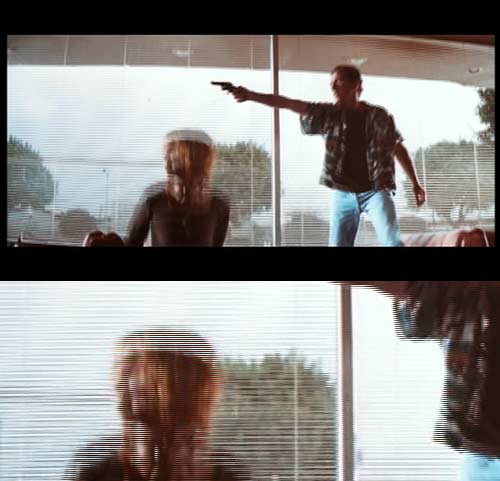
Last night I uploaded my Blu-ray vs DVD comparison for Pulp Fiction. See it here. It presented a few difficulties, discussed in the comparison, but primarily because the Australian DVD is such a shockly bad transfer. Here, for example, is a frame grab from the DVD, with the bottom section being a detail of the whole frame, unscaled:
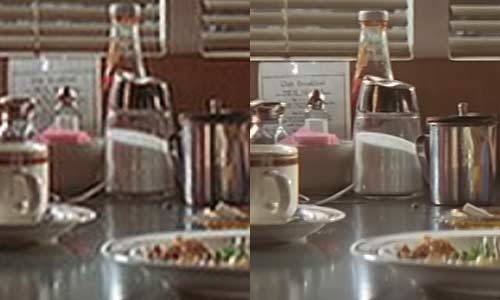
In the end I decided to use the UK version of the DVD for the comparison. Here's one of the shots (DVD left, Blu-ray right):
Yes, the inventor of HD DVD has finally decided to join in with Blu-ray. Its BDX2000 is available today. Price: $329. Feature list:
- BD-Live
- DivX HD and AVCHD Playback
- Toshiba REGZA-LINK® (HDMI-CEC)
- Support for enhanced audio formats of Dolby® TrueHD and DTS-HD Master Audio | Essential
- Bonus View
- SD Card Slot (SDHC Compatible)
- Deep Colour
But I'm not absolutely certain that this Blu-ray player is fully Toshiba. I haven't seen it yet, and I haven't researched it, but my guess is that it is based on a Panasonic platform. The use of an SD card slot, and support for DTS-HD MA 'Essential' rings of Panasonic.
Still, there are a lot worse platforms on which to base a Blu-ray player.
UPDATE (Tuesday, 19 January 2010, 6:53 am): I've had my hands on this player for a while now, and if it is based on a Panasonic platform -- or any other -- it is not apparent to me. I think this one may well be all Toshiba's own work.
Over on the AVS Forum Blu-ray Audio and Video Specifications Thread, we whinge, rightly, about average video bitrates of less than 20Mbps, sometimes even less than 15Mbps, on Blu-ray.
Still we should keep things in perspective. Apparently the BBC HD Service reduced its VBR from 19Mbps, to 16Mbps and, now, to 9.7Mbps. This is MPEG4 AVC, I understand, at 1080i50, but still that's a shocker. Viewers complained. The Head of BBC HD, BBC Vision, Danielle Nagler, responded by patting everyone on the hand in a kindly manner, and saying that of course the reduction didn't damage picture quality. If you see a problem, well, it's all in your head:
We all need to accept that a great deal of our perception of HD picture quality is driven by our pre-conceptions. Some Dutch research published last month (the report I saw was from Informa, dated 28 Oct 09) highlights the extent to which views on picture quality are driven by expectation and emotion. ... I have no doubt that for those who believe the bitrate cut has killed picture quality, none of the changes to the encoders that we will make to address the problems which we know are there will make any difference, unless they go hand in hand with an announcement that we've upped the bitrate.I would not necessarily expect that the head of BBC HD would be a technical expert. Management expertise is probably more relevant to the job. But she should not pose as one either. Just because the clueless (those who think SDTV seen on a high res panel is HDTV) can't see the difference, doesn't mean that those who do see a difference are wrong.
In fact, low bitrate 'broadcast' type transmissions (including those constrained by cable delivery) are even worse than Blu-rays with the same average. HDTV and so on has to be approximately constant in its bitrate, whereas a Blu-ray can have a wide variation in its bitrate over time. Consider, for example, a low average bitrate title such as Blood Diamond. This has to make do with just 12.72 Mbps on average. But look at the graph showing what the bitrate is from second to second over the course of the movie:
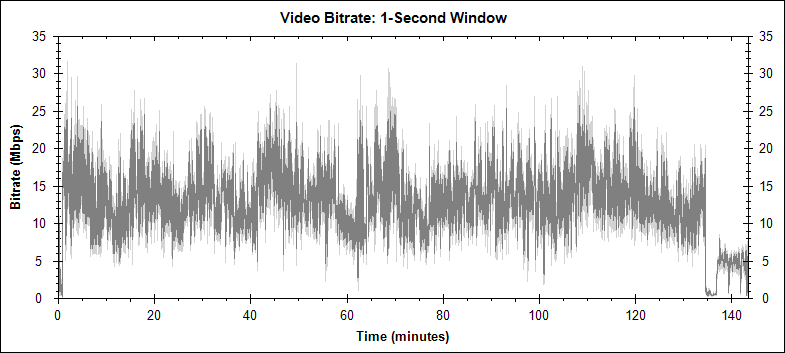
I am not a bitrate supremacist. I disagree with those who insist that an 18Mbps Blu-ray isn't worth having, or that 28Mbps is necessary better, visually, than 20Mbps. But you get to a low enough figure, and you get crap. My bet is that 9.7Mbps is below that point, at least on some material.
This was an announcement I received today from Roadshow Entertainment. I shall feed through more info as it becomes available, but it seems that we'll see LOTR on Blu-ray in April 2010:
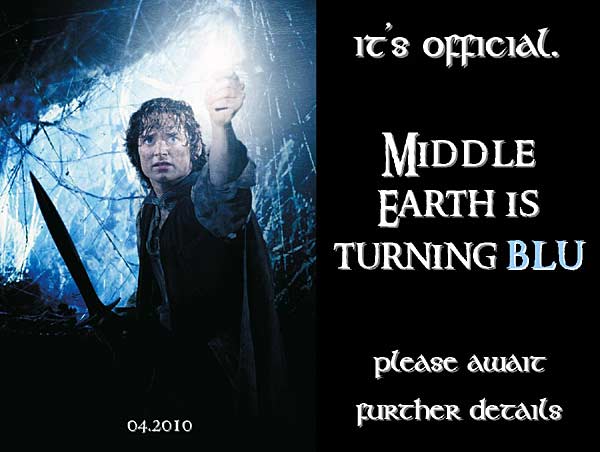
I may be silly, but I suspect that there are few movies that could more make use of the higher resolution of Blu-ray than this trilogy.
As the title implies, I've been very busy the last couple of weeks. Still am. But here's one thing that I reckon is interesting: an Audio Engineering Society Convention Paper from 2004, entitled 'DVD-Audio versus SACD: Perceptual Discrimination of Digital Audio Coding Formats - Listening Comparison Test between DSD and High Resolution PCM (24-bit / 176.4 kHz)'
It's well worth a read, but to cut to the conclusion:
These listening tests indicate that as a rule, no significant differences could be heard between DSD and high-resolution PCM (24-bit / 176.4 kHz) even with the best equipment, under optimal listening conditions, and with test subjects who had varied listening experience and various ways of focusing on what they hear. Consequently it could be proposed that neither of these systems has a scientific basis for claiming audible superiority over the other....
Though less readily formulated with mathematical equations, the high level of frustration felt by many subjects during their tests left quite a strong impression. These people, for the most part, were well accustomed to critical listening on a professional level, but they found that they could not even begin to recognize any sonic differences.
I have posted three copies of Heat on Blu-ray to three readers who undertook my Blu-ray picture quality survey. They were:
- Shane from the Gold Coast,
- Des from Queensland, and
- Simon Hewlett from Calwell, ACT, not far from where I am.
I should note that all three got the wrong answers, but did it in a good way. One of them got nine out of ten wrong, while the other two got all ten wrong.
Let's go back and see what this tells us. The challenge was to compare two versions of the same frame, for ten different frames, and then work out whether they belonged to the original theatrical version of Natural Born Killer on Blu-ray, which had a fairly high 27.75Mbps average bitrate, or to the Director's Cut version, which had a significantly lower 20.02Mbps.
What does that tell us? Well, there were basically two components to the challenge. The first was identify whether there were indeed quality differences between the two frames in each case, and then decide whether the superior version of each frame belonged to one or the other version of the movie.
Four people undertook the challenge and emailed me with a response. Three of the four correctly grouped together all ten of the frames from each version of the movie, and the fourth correctly grouped all but one.
Clearly, these four people proved themselves very competent at judging picture quality because of their high degree of accuracy.
Things went awry in the next stage: working out whether the better quality frames were from the high bitrate theatrical cut, or the lower bitrate Director's cut. The three above assumed that the high quality went with the high bitrate. But the truth is, it was exactly the reverse in this example. The Director's Cut has much more natural colour, and a greater level of detail that ranges from moderate to large.
Did the lower video bitrate damage picture quality? Perhaps. But to the extent that it did, its effects were completely swamped by the quality of the print used.
Incidentally, one person not only grouped the two lots of ten correctly, but allocated them to the correct versions of the movie. He wasn't eligible to win the disc because he lives in America. He tells me that it was the 'overly saturated colors of the theatrical' version that gave the game away, since he'd read of that in US reviews.
So, perhaps it is fitting to give the final word to that US participant, author of BDInfo and webmaster of the Cinema Squid Blu-ray Movie Database:
A very concrete lesson that bitrate is not everything!
I reviewed a bunch of reasonably low cost home theatre receivers a little while back, and this was published in Sound and Image magazine. Despite them all costing well under a thousand dollars, the feature sets and performance of all of them were pretty startling.
But I did manage to get one thing wrong. I indicated that the Yamaha RX-V465 receiver didn't have assignable inputs. Wrong, it does.
Some months ago Scott Fitzgerald, the Gadget Guy's Web Master, mentioned to me a 'jarring "dual quality" of image' on this wonderful two disc Blu-ray release of the 1995 TV mini-series version of Pride and Prejudice.
It's taken me awhile to get around to watching this wonderful version. It has been many years (I last saw it on VHS). The video quality was a little variable, but not grossly so for the most part. There was some fine detail instability on exterior building shots, and a very occasional soft focus, but none that several strained my levels of tolerance.
Until the very end of the final episode. At 43:33 a tracking shot commences that lasts until a fade cut at 45:10, and this rather long shot is so noticably inferior to all that has been before (and all that comes after) as to be quite distracting. It's almost as though the producers simply forgot to restore this section of the footage.
So what we have is Miss Elizabeth Bennett and Mr Darcy walking along a country lane, so:


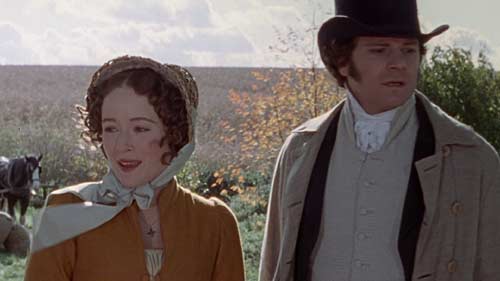


But don't let that put you off. This is a glorious show, and the picture is far better (for the most part) than it has any right to be for a 1990s made for TV show.
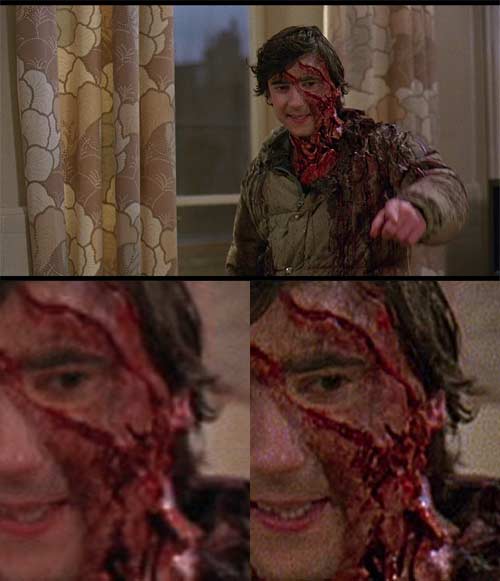
Here's another Blu-ray vs DVD comparison: An American Werewolf in London. Oddly, reviews seem to overlook the marked graininess of the Blu-ray, but it is nonetheless a huge improvement over the DVD. Here's a sample:
I have uploaded my three latest 'Know It All' columns from Geare magazine. Feel free to check them out if you want to see an overview of hybrid cars, how video compression works, or why 576i and 1080i are sometimes referred to as 625i and 1125i.
In the last day or so I've uploaded two new Blu-ray vs DVD comparisons -- Black Hawk Down and A History of Violence -- along with my Sound and Image reviews of Sin City (which already had a comparison up), Watchmen and The Da Vinci Code.
Here's one of the comparison shots from Black Hawk Down: